



What Is Electronic Claim Submission? Process, Benefits & Common Errors
- Updated Date Sep 16, 2026
- Claims Submission
- Follow
Paper claim submission slows everything down. Claims take longer to reach the payer, errors are harder to catch, follow-up becomes messy, and payments can get delayed for reasons that could have been avoided.
Electronic claim submission solves many of these problems by sending claims through a secure digital system instead of mailing paper forms. It allows practices to submit claims faster, track claim status more easily, reduce manual errors, and improve control over the billing process.
For providers, this is not just a technology upgrade. It directly affects cash flow, claim turnaround time, staff workload, and the ability to manage revenue more predictably.
What Is Electronic Claim Submission?
Electronic claim submission is the process of sending medical claims to insurance payers through a digital system instead of using paper claim forms.
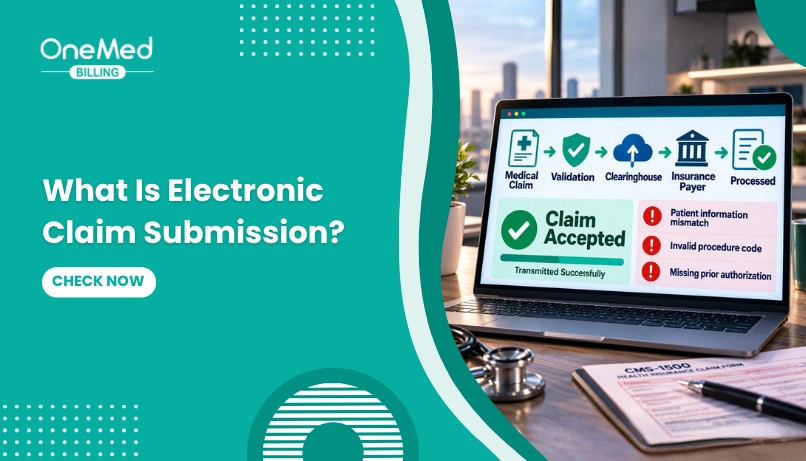
In medical billing, this usually happens through billing software, an EHR, a practice management system, or a clearinghouse. The claim is created electronically, checked for errors, formatted according to payer requirements, and then transmitted securely to the insurance company for processing.
For professional services, electronic claims are commonly submitted in the 837P format, which is the digital version used instead of the paper CMS-1500 claim form. For institutional billing, hospitals and facilities commonly use the 837I format, which is connected to the CMS-1450 or UB-04 claim form.
How Electronic Claim Submission Works?
Electronic claim submission follows a step-by-step process that moves a claim from the provider’s billing system to the insurance payer through a secure digital route. The goal is to send the claim faster, reduce manual errors, and make it easier to track the claim from submission to payment.
Step 1. Patient and Insurance Details Are Collected
The process starts with accurate patient and insurance information. This includes the patient’s name, date of birth, member ID, group number, payer name, and policy details.
If this information is incorrect, the claim may be rejected before the payer even reviews the service. That is why front-end accuracy matters so much in electronic claim submission.
Step 2. Eligibility Is Verified
Before the claim is submitted, the practice should verify the patient’s insurance eligibility. This confirms whether the patient’s coverage is active, what benefits apply, and whether the service may need prior authorization.
This step helps prevent claims from being submitted for inactive coverage, non-covered services, or missing authorization requirements.
Step 3. The Claim Is Created in the Billing System
After the visit is documented and coded, the claim is created in the billing software. The claim includes provider details, patient information, diagnosis codes, procedure codes, modifiers, charges, place of service, and other required fields.
Professional claims are commonly prepared using the CMS-1500 format, while institutional claims use the UB-04 format.
Step 4. The Claim Is Checked for Errors
Before the claim is sent, the billing system or clearinghouse checks it for common errors. This is often called claim scrubbing.
The system may flag missing fields, invalid codes, incorrect modifiers, payer rule issues, duplicate claims, or insurance mismatches. These errors should be corrected before submission to reduce rejections and preventable denials.
Step 5. The Claim Is Sent to the Clearinghouse
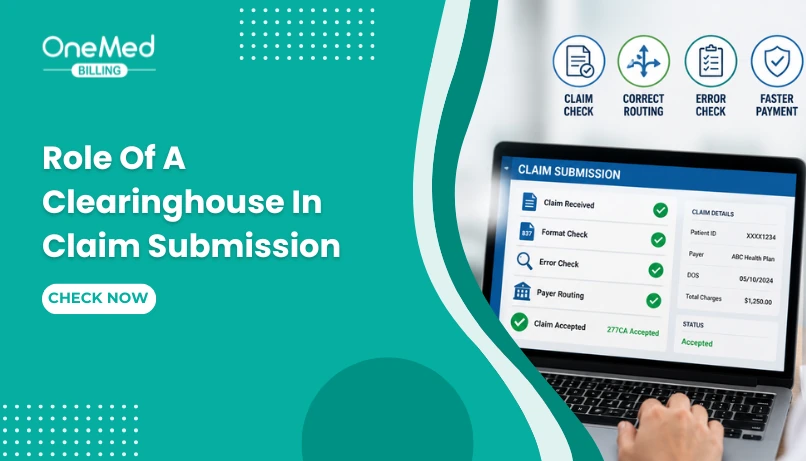
Many practices send electronic claims through a clearinghouse. The clearinghouse acts as a middle layer between the provider and the insurance payer.
It reviews the claim, applies payer-specific edits, converts the claim into the required format, and routes it to the correct insurance company.
Step 6. The Payer Receives and Reviews the Claim
Once the payer receives the claim, it goes through the payer’s review process. The payer checks coverage, coding, medical necessity, authorization, contract rules, and payment policies.
The claim may be accepted, rejected, denied, paid, or sent back for more information.
Step 7. Claim Status and Responses Are Tracked
After submission, the practice can track the claim status electronically. This may include updates such as accepted, rejected, pending, denied, or paid.
These updates help billing teams act faster. If a claim is rejected, they can correct and resubmit it quickly. If it is denied, they can review the reason and begin follow-up or appeal work.
Step 8. Payment and Remittance Are Posted
Once the claim is processed, the payer sends payment details through an Electronic Remittance Advice, often called an ERA. The ERA explains what was paid, adjusted, denied, or left as patient responsibility.
The billing team then posts the payment, reviews any remaining balance, and follows up on unpaid or underpaid claims.
Electronic Claims vs Paper Claims
Electronic claims and paper claims serve the same purpose, which is to send billing information to the insurance payer for payment. The main difference is how the claim is submitted, processed, tracked, and corrected.
Electronic claims are submitted through billing software or a clearinghouse. They move faster, are easier to track, and can be checked for errors before submission. Paper claims are printed and mailed, which makes the process slower and more dependent on manual handling.
| Area | Electronic Claims | Paper Claims |
|---|---|---|
| Submission method | Sent digitally through billing software or a clearinghouse | Printed and mailed to the payer |
| Processing speed | Faster because the payer receives the claim electronically | Slower due to mailing, scanning, and manual handling |
| Error checking | Can be checked through built-in claim scrubbing tools | Errors are harder to catch before submission |
| Tracking | Claim status can usually be tracked online | Tracking is limited and often requires payer follow-up |
| Cost | Lower long-term cost with less paper, postage, and manual work | Higher admin cost due to printing, mailing, and staff time |
| Rework | Easier to correct and resubmit rejected claims | Corrections take longer because the process is manual |
| Best for | Most routine medical claims | Payers or situations that still require paper submission |
For most practices, electronic claim submission is the better option because it reduces manual work, speeds up claim movement, and gives billing teams better visibility. Paper claims may still be needed in some cases, but they should not be the main submission method unless the payer requires it.
How to Submit Claims Electronically?
Submitting claims electronically isn’t complicated; it just takes the right tools and a step-by-step process. Here’s how you can submit a claim electronically:
1. Use a Billing Software or Clearinghouse
First, you’ll need access to a billing system or a clearinghouse. This is the platform that creates and sends your claims. Many practices use medical billing software that connects directly to insurers, while others go through a third-party clearinghouse that checks and routes the claims.
2. Enter Complete Patient and Insurance Details
Before you submit anything, make sure all the patient’s information is filled out accurately, including their insurance ID, date of birth, diagnosis codes, and treatment details. Even small mistakes can lead to rejections.
3. Verify Eligibility First (Optional but Smart)
It’s a good idea to check insurance eligibility before submitting the claim. This helps you catch coverage issues early so you’re not submitting a claim for a non-covered service.
4. Create the Claim
Once the visit is complete and everything is documented, your system creates the claim using standard formats (like the CMS-1500 for professional claims). This includes the provider info, diagnosis codes (ICD-10), and procedure codes (CPT or HCPCS).
5. Check for Errors Before Sending
Most billing systems or clearinghouses will scan your claim for common mistakes before sending it. These built-in “claim scrubbing” tools help reduce denials by catching missing fields or mismatched codes.
6. Submit the Claim to the Payer
Once everything checks out, the claim is transmitted electronically to the insurance company. This is usually done through secure, HIPAA-compliant channels.
Role of Clearinghouses in Electronic Claim Submission
A clearinghouse acts as the middle layer between the healthcare provider and the insurance payer. Instead of sending claims to each payer one by one, the provider sends claims to the clearinghouse, and the clearinghouse reviews, formats, and routes them to the correct insurance company.
This step is important because every payer may have different submission rules, payer IDs, formatting requirements, and claim edits. The clearinghouse helps make sure the claim is in the right format before it reaches the payer.
Clearinghouses also check claims for common errors, such as missing patient information, invalid insurance details, incorrect payer IDs, coding issues, or required fields that were left blank. If an issue is found, the claim may be returned to the billing team for correction before it is sent forward.
This helps practices reduce front-end rejections, submit cleaner claims, and track claim status more easily. Once the claim is accepted by the payer, the clearinghouse can also help send back updates, rejection reports, and payment-related information.
Common Electronic Claim Submission Formats
Electronic claims are usually sent in standard claim formats so billing systems, clearinghouses, and insurance payers can read the information correctly. These formats help organize patient details, provider information, diagnosis codes, procedure codes, charges, and other required claim data in a consistent way.
The most common electronic claim formats are 837P, 837I, and 837D.
1. 837P for Professional Claims
837P is used for professional healthcare claims. These are claims submitted by individual providers or professional practices, such as physicians, therapists, specialists, and other outpatient service providers.
It is the electronic version of the CMS-1500 claim form. It usually includes services such as office visits, consultations, diagnostic tests, minor procedures, therapy sessions, and other provider-based services.
2. 837I for Institutional Claims
837I is used for institutional claims. These are claims submitted by hospitals, skilled nursing facilities, outpatient facilities, and other healthcare institutions.
It is the electronic version of the UB-04 claim form. It includes facility-level billing details such as revenue codes, room and board charges, inpatient or outpatient facility services, and other institutional billing information.
3. 837D for Dental Claims
837D is used for dental claims. These are claims submitted by dental providers for services such as exams, cleanings, fillings, crowns, extractions, and other dental procedures.
Related electronic billing transactions include 835 ERA for payment and adjustment details, 270 and 271 for eligibility verification, 276 and 277 for claim status, and 278 for prior authorization or referral requests. These are not claim submission formats, but they support the wider electronic billing process.
Benefits of Filing Claims Electronically
Let’s be honest, handling claims manually is a pain. You deal with delays, human errors, lost paperwork, and endless back-and-forth with payers. That’s why more and more practices are switching to electronic claim submission.
Instead of printing forms or faxing them (and hoping they go through), you send the claim straight from your billing software to the insurance company. It’s faster, cleaner, and gives you a better shot at getting paid on time, without the usual drama. Here’s how it helps in detail:
You Get Paid Faster Without Waiting for Mail
Electronic submissions send your claims directly to the insurance payer within seconds. There's no waiting for physical mail to arrive, no time wasted in transit, and no manual data entry once it gets there. In many cases, insurers process electronic claims within 7 to 14 days, sometimes even faster compared to 30+ days with paper claims.
Fewer Claim Errors Means Fewer Denials
Mistakes like mismatched patient info, missing modifiers, or incorrect CPT/ICD-10 codes are common reasons for denials. Electronic systems often have built-in validation checks that flag these issues before the claim is sent. That means your claims are more likely to be accepted the first time.
You Spend Less Money on Paper, Postage, and Admin
Paper-based billing comes with hidden costs, including printing, envelopes, postage, scanner time, and staff hours. All that adds up quickly. By going digital, you cut down these expenses significantly. Your team also saves time by submitting in bulk through your billing software, freeing them up for tasks that directly impact patient care or collections.
You Can Track Claim Status in Real-Time
Electronic claim submission systems give you live status updates on every claim, submitted, accepted, denied, or paid. You no longer need to call payers or check paper reports. This real-time visibility makes it easier to prioritize follow-ups, catch problems early, and reduce the chance of claims getting lost in the shuffle.
It’s Easier to Stay Compliant with Rules and Payers
Every insurance company has slightly different billing rules and requirements. Electronic systems are regularly updated to follow the latest payer rules and HIPAA guidelines. That means you don’t have to worry as much about non-compliant claims, missed deadlines, or formatting errors.
More Clean Claims Mean More Reliable Revenue
Electronic claim submission is not only about speed. The goal is to make sure clean claims are submitted with the right patient details, payer information, provider data, codes, and required fields. When claims go out clean the first time, the practice spends less time fixing rejections and resubmitting the same accounts. That makes reimbursement more predictable and gives the billing team better control over the submission process.
Limitations of Electronic Claim Submission
Electronic claim submission is faster and easier to manage than paper billing, but it does not remove every problem from the claim process. Claims can still be rejected or denied if the information entered is wrong, payer rules are missed, or required documents are not included.
It also depends heavily on the billing system, clearinghouse, and payer connection. If the setup is wrong or the system is not updated, claims may still fail even when they are submitted electronically.
Common limitations include:
- Not every payer accepts every type of electronic claim
- Initial setup can take time, especially payer enrollment and clearinghouse configuration
- Incorrect patient details, codes, or modifiers can still cause rejections
- Some claims may still require attachments, medical records, or manual review
- System downtime can delay claim submission or status updates
- Payer-specific rules still need regular monitoring
- Staff still need proper billing knowledge to correct errors and follow up
Electronic claim submission improves speed and tracking, but it does not replace a strong billing process. Providers still need accurate documentation, clean coding, eligibility checks, claim scrubbing, and timely follow-up to get the best results.
When Should Providers Outsource Claim Submission?
Providers should consider outsourcing claim submission when the process starts taking too much time, creating too many errors, or slowing down reimbursement. Claim submission may look simple from the outside, but it requires accurate patient data, correct coding, payer rule checks, claim scrubbing, timely submission, and regular follow-up. For practices that need support, working with a team that provides professional claim submission services can help keep the process cleaner and more consistent.
Outsourcing can be helpful when an in-house team is overloaded, short-staffed, or spending too much time fixing rejected claims instead of focusing on higher-value billing work. It can also help smaller practices that do not have a dedicated billing team or larger practices that are dealing with high claim volume across multiple payers.
Common signs it may be time to outsource include:
- Claims are often rejected for missing or incorrect information
- Payments are getting delayed because claims are not being submitted on time
- Your team spends too much time correcting and resubmitting claims
- Denials are increasing because payer rules are not being checked properly
- Staff members are stretched between billing, front desk, and patient work
- You do not have enough time to track claim status and follow up properly
- Your practice is growing and claim volume is becoming harder to manage
- You want a cleaner, more consistent claim submission process
Outsourcing does not mean losing control of your billing. A good billing partner should keep the process organized, transparent, and easy to track. For providers, the goal is simple. Claims should go out clean, on time, and with fewer avoidable errors, so payments do not get stuck because of submission issues.
Frequently Asked Questions
Find quick answers to common questions about this topic, explained simply and clearly.
What is electronic claim submission?
It's the digital process of sending medical claims to insurers, replacing paper forms for faster and more accurate payments.
How do I submit medical claims electronically?
Use billing software or a clearinghouse to create, validate, and send claims directly to payers through secure, HIPAA-compliant systems.
How fast are electronic claims processed?
Most electronic claims are processed in 7–14 days, compared to 30+ days for paper submissions.
Are electronic claims more reliable?
Yes, they go through automatic checks to catch errors before submission, reducing denials and rework.
Can I outsource electronic claim submissions?
Yes, many providers use medical billing companies to handle claim submission services for better accuracy and faster payments.